LiteLLM 代理:协议不兼容时的「翻译官」
当你想用的客户端(如 Claude Code、Cursor、某款 IDE 插件)和后端模型(如 Azure OpenAI、本地 Ollama)协议不一致时,直接对接会报错。LiteLLM 代理就是中间的「翻译官」:把客户端发来的请求转成后端能识别的格式,再转发过去。
适用场景很多:IDE 只认 OpenAI 格式、后端却是 Anthropic;工具按 Anthropic 规范发请求、模型在 Azure 上;多模型统一入口、负载均衡、参数过滤……本文以我遇到的场景——Claude Code 想用 Azure 上的 GPT-5.2——为例,把搭建过程、配置要点和踩过的坑整理出来,供类似需求参考。
LiteLLM 代理能做什么?
| 能力 | 说明 |
|---|---|
| 协议转换 | Anthropic ↔ OpenAI ↔ 其他格式,按需转换 |
| 参数过滤 | 丢弃后端不支持的参数(如 thinking、output_config) |
| 模型映射 | 客户端用 A 模型名,代理转发到 B 模型 |
| 统一入口 | 多模型、多后端,一个代理统一路由 |
不只 Claude Code 会用到,任何「客户端协议 ≠ 后端接口」的组合,都可以考虑用 LiteLLM 做中间层。
我遇到的场景:Claude Code + Azure OpenAI
Claude Code 默认走 Anthropic API(/v1/messages、Anthropic 格式),Azure OpenAI 只认 OpenAI 格式(chat/completions)。二者协议不同,无法直连。
| 组件 | 协议 | 请求格式 |
|---|---|---|
| Claude Code | Anthropic API | messages、metadata、tool_choice 等 |
| Azure OpenAI | OpenAI API | messages、tools、response_format 等 |
LiteLLM 代理在中间做转换:收到 Anthropic 格式 → 转成 OpenAI 格式 → 转发给 Azure → 再把响应转回客户端能识别的格式。
快速上手
项目结构大致如下:
claude-code-openai-proxy/ |
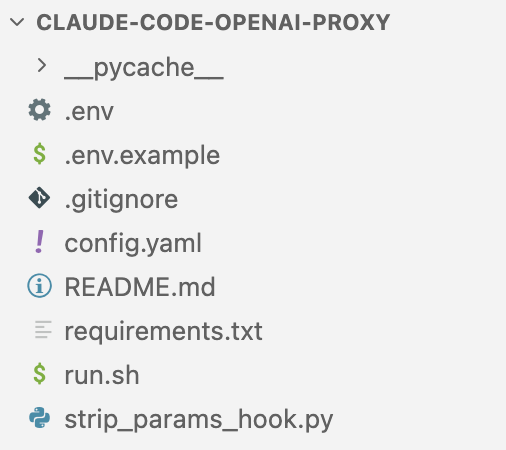
三步启动:
# 1. 安装依赖 |
代理默认监听 http://localhost:4000。启动成功后,终端会显示已加载的模型(如 gpt-4o、gpt-5.2-chat 等)及 Uvicorn running on http://0.0.0.0:4000。
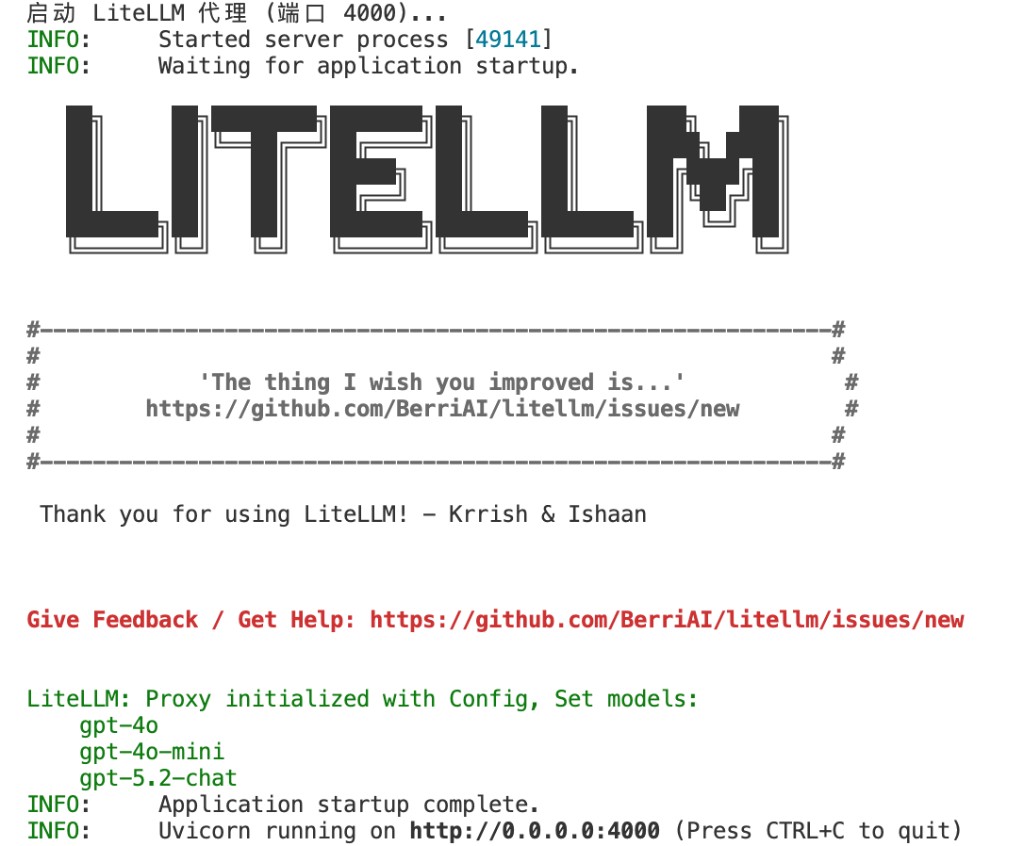
配置要点
配置主要在两个文件里:config.yaml(模型、参数、别名等)和 .env(API Key、密钥等敏感信息)。下面逐项说明在哪个文件、怎么改。
模型列表(model_list)
文件:config.yaml(项目根目录)
支持多模型:OpenAI 直连 + Azure 部署。用任意编辑器打开 config.yaml,在顶层添加或修改 model_list 块:
model_list: |
model_name:客户端使用的名称litellm_params.model:azure/<部署名>表示走 Azureapi_base:Azure 资源端点(在 Azure 门户 → 你的资源 → 密钥和终结点 中查看)api_version:Azure API 版本api_key: os.environ/XXX:表示从环境变量读取,需在.env中定义XXX=你的密钥
.env 示例(复制 .env.example 为 .env 后填入):
OPENAI_API_KEY=sk-xxx |
参数过滤(drop_params)
文件:config.yaml
Claude Code 会发送 thinking、output_config 等参数,Azure 不支持,需丢弃:
litellm_settings: |
将上述内容放在 config.yaml 的 litellm_settings: 下。若文件中已有 litellm_settings,把 drop_params 和 additional_drop_params 合并进去即可。
模型别名(model_alias_map)
文件:config.yaml,同样在 litellm_settings: 下
Claude Code 默认使用 claude-haiku-4-5-20251001 等模型名,需映射到代理中的实际模型:
litellm_settings: |
自定义 Pre-Call Hook
文件:strip_params_hook.py(项目根目录)+ config.yaml 注册
当 additional_drop_params 仍无法完全过滤时,可用自定义 hook 在请求发出前剥离参数:
# strip_params_hook.py |
在项目根目录新建 strip_params_hook.py,粘贴上述代码保存。然后在 config.yaml 的 litellm_settings 中注册:
litellm_settings: |
config.yaml 完整示例(供参考)
以上配置可合并到一个 config.yaml 中,结构如下。新手可直接复制后按需修改 api_base、api_version 等:
model_list: |
客户端配置(以 Claude Code 为例)
安装 Claude Code
# 方式 1:npm(推荐) |
使用配置文件(推荐)
编辑 ~/.claude/settings.json:
{ |
使用方式
- 启动代理(终端 1):
./run.sh - 启动 Claude Code(终端 2):
claude --model gpt-5.2-chat
若已配置模型别名,不指定 --model 时,默认模型也会被映射到 gpt-5.2-chat。
踩过的坑
| 报错关键词 | 原因 | 解决 |
|---|---|---|
output_config |
Azure 不支持该参数 | additional_drop_params: ["output_config"] |
thinking |
Anthropic 特有,Azure 不支持 | additional_drop_params 中加入 "thinking" |
Invalid model name |
模型名未映射 | model_alias_map 中配置别名 |
--master_key |
新版已废弃该参数 | 改用环境变量 LITELLM_MASTER_KEY |
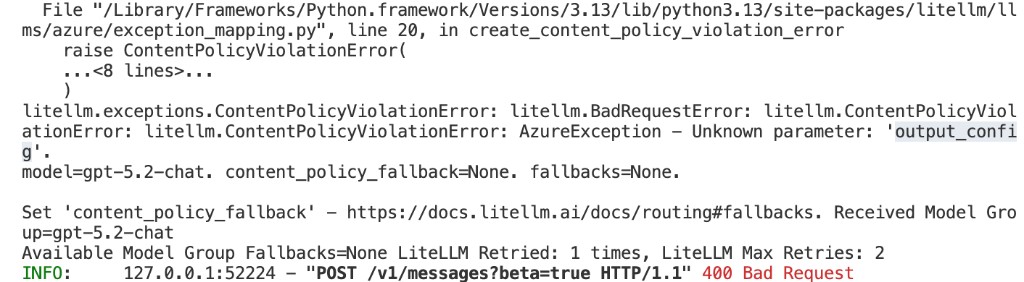
下面按报错类型展开说明,并附终端截图供对照。
① Unknown parameter: 'output_config'
Claude Code 会发送
output_config,Azure 不认,导致 400 Bad Request。
解决:在 config.yaml 的 litellm_settings 中启用 drop_params: true,并在 additional_drop_params 中加入 "output_config"。若仍报错,可用自定义 async_pre_call_hook 在请求前剥离。
② azure does not support parameters: ['thinking']
thinking为 Anthropic 扩展参数,Azure 不支持。
解决:在 additional_drop_params 中加入 "thinking"。
![错误示例:azure does not support parameters: ['thinking']](/img/litellm-error-thinking.png)
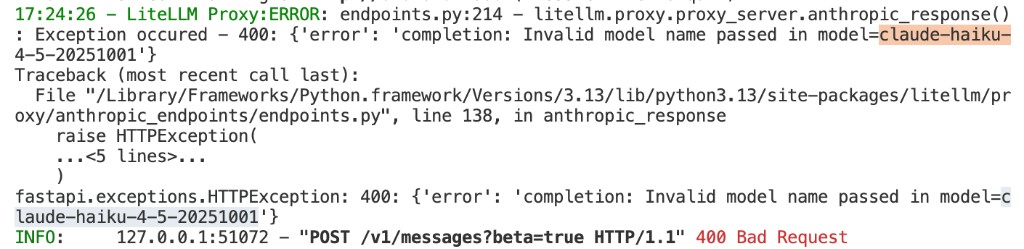
③ Invalid model name passed in model=claude-haiku-4-5-20251001
Claude Code 默认用
claude-haiku-4-5-20251001等模型名,代理中未配置,无法路由。
解决:在 model_alias_map 中将 claude-haiku-4-5-20251001 映射到实际部署名(如 gpt-5.2-chat)。
④ No such option: --master_key
新版 LiteLLM 已移除
--master_key命令行参数。
解决:在 .env 中设置 LITELLM_MASTER_KEY=你的密钥,run.sh 加载后会自动生效。检查 run.sh 是否仍带 --master_key,若有则删除。

架构示意
┌─────────────────┐ Anthropic 格式 ┌──────────────────┐ OpenAI 格式 ┌─────────────────┐ |
小结
LiteLLM 代理解决的是「客户端协议 ≠ 后端接口」的问题,不只 Claude Code,各类需要协议转换、API 转发的场景都能用。核心配置:model_list、drop_params、model_alias_map,必要时加自定义 hook 过滤参数。客户端通过 ANTHROPIC_BASE_URL 或 OPENAI_BASE_URL 指向代理即可。踩坑时优先检查 output_config、thinking 是否被过滤,以及模型别名是否配置正确。